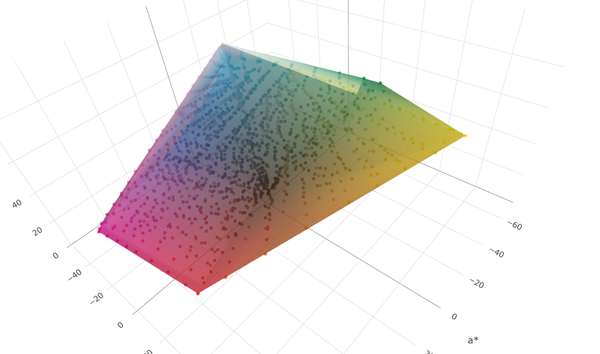
This app grew out of a need I had to manipulate color characterization data sets.
Characterization data sets are sets of color coordinates, typically measured with an instrument such as a spectrophotometer (occasionally synthetically-generated). For reflective data (i.e. printed colors), each data point is usually an association between a set of device colorants and the measurement, which will be some combination of colorimetry and spectral reflectance.
There’s a bit more complication to the full pedantic definition, but let’s put that aside to another article, shall we? The primary, initial use case for me is reflective print – printed colors, halftones, all that. Reflective color means that we can assume that:
- Spectral reflectance values range between 0 and 100%.
- L*a*b* colorimetry runs between (0,0,0) and (100,0,0).
- Device colorants (subtractive, remember?) range between 0 and 100%.
Scene and transmissive colorimetry can have other ranges, but I’m not yet interested in that, hence this tool.
Here are some of the major categories of functionality I needed:
- Loading and saving characterization data in at least CGATS and CSV formats.
- Extracting subsets of data.
- Displaying data points and gamut extents.
- Displaying spectral reflectance curves.
- Handling multiple data sets at a time, ideally with drag-and-drop functionality.
- Desktop and mobile usage.
Alongside these feature classes, I also wanted to minimize the cost of running the app. Although I could have used a local app built with C++, I decided a Node.js app worked better for this purpose, as it also gave me the option to more easily freely distribute this. Node.js means that the bulk of the processing happens on the ground, using the local CPU running the browser, rather than my own cloud processing money. Design-wise, forgoing any cloud storage both greatly simplifies the design (goodbye multi-tenant security!) and also makes the app more widely acceptable.
Frankly, writing a CGATS parser is a bit of a rite of passage for young color science developers and I remember building a C++ class around this eons ago. It’s human-readable more-or-less-flat text, but it’s all the variations kicking around out there which add feature creep…
So crunching all of those features together in Claude was fairly quick. The actual detailed coding bit I mostly didn’t need to touch, so I could spend the bulk of my time iterating the design itself in terms of usability and correctness. Over 2/3 of my design time working on this app so far has fallen into the category of issues like figuring out what is an intuitive version of features such as drag-and-drop, and how to make the app work on both mobile and desktop equally, rather than core computational or visualization functionality.
Some features, such as 3d plotting and data table display, went as expected with simple single prompts leading to the features getting added. Others, such as the data validation on file load, required a bit more hands-on shaping because of expected vagueness in the specification. And still others, Claude confidently went out to the Internet, implemented something which looked correct, and was yet utterly 100% wrong in implementation, such as “Fogra Media Wedge validation” or “G7 validation”.
This is perhaps the single biggest warning flag to casual Claude code users – if you don’t understand the problem domain well enough to explain it to Claude in great detail, you’re rolling the dice as to whether it’ll give you the right results. That’s because Claude can only know what it can find on the Internet, and then has to guess based on no other underlying knowledge whether what it found is correct or not.
In the case of G7 validation, for example, the report generated by the app initially looked vaguely correct, but when I looked at the implementation it had found for calculating the results, it was not correct. A more correct (but not the most token-efficient) way I ended up implementing the G7 validation was to feed it the text of ANSI-CGATS TR015, pointing it to focus on specific sections and equations, then explicitly telling it how to generate a compliance report (based on ΔF and ΔL).
Claude also let me easily set up an entire push-to-web workflow including GitHub pushes and pulls. By giving it permission to access my AWS account and Git repo, I was able (through a few iterations) to get Claude to work through all the file permissions, etc. to get it set up such that after I had Claude make a change to my local copy of the app, Claude would push and deploy within seconds.
As an aside, I was so productive I was able to simultaneously Claude Code the app, my website (currently going through redesign), and write blog articles. I could not imagine doing something like this without an AI assistant!